LabVIEW
Send Autumn Labs station data from LabVIEW using local TCP ingestion.
Autumn Labs does not require a native LabVIEW SDK. A LabVIEW application can send data to the Autumn Labs client by opening a local TCP connection and writing newline-delimited JSON.
For the complete TCP envelope and supported event families, see Local TCP Ingestion. For the message format specifically, start with the TCP message envelope and metric example.
Requirements
- Autumn Labs client installed on the station PC.
- Station registered with
al register. - Autumn Labs services running with
al start. - LabVIEW TCP functions available in your LabVIEW environment.
Endpoint
Open a TCP connection to the local Autumn Labs client:
Host: 127.0.0.1
Port: 5700
Station ID
The payload needs the registered station ID in the payload sid field. Run:
al info --verboseThe station ID is printed as:
stationID=<value>Use that value in the LabVIEW VI as a string control, constant, or configuration value.
LabVIEW TCP shape
NI documents the LabVIEW TCP functions as the built-in way to open a TCP client connection and write string data to it. Use TCP Open Connection with address 127.0.0.1 and port 5700, then use TCP Write to send one JSON message followed by a newline character.
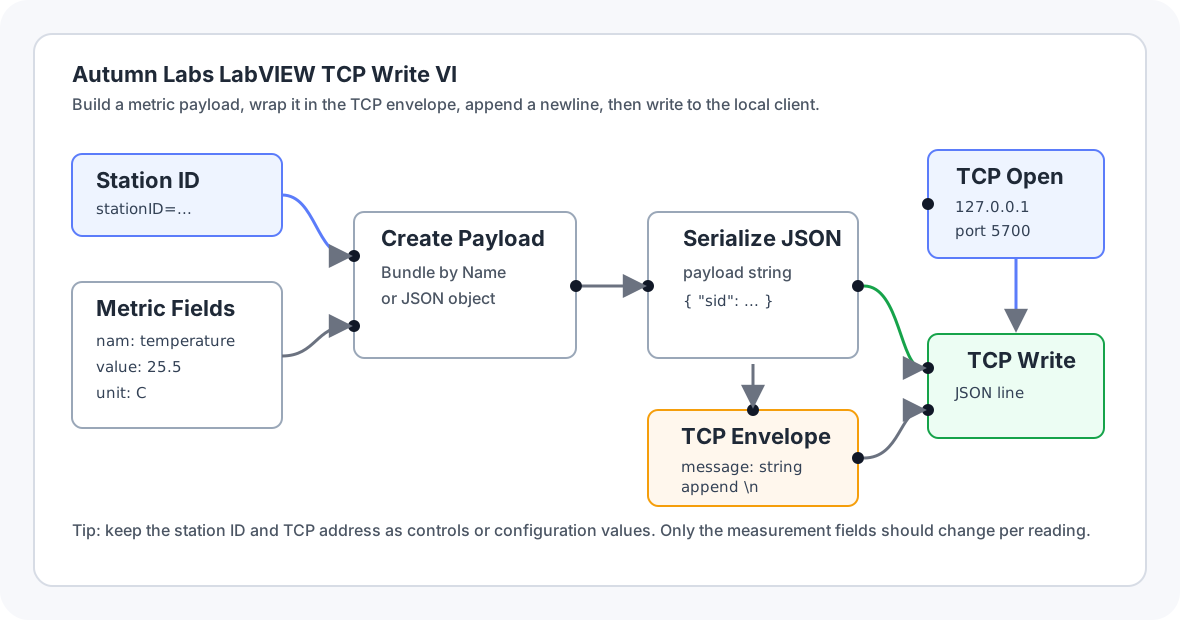
Build the VI in this order:
- Create the metric payload with
sid, timestamp, unit serial number, metric name, metric value, limits, tags, and result fields. - Serialize the metric payload to a JSON string.
- Create the TCP envelope with
source_type,file,station_id, andmessage. - Serialize the envelope to JSON.
- Append a newline character (
\n) to the serialized envelope. - Use
TCP Open Connectionto connect to127.0.0.1on port5700. - Use
TCP Writeto send the serialized envelope plus newline. - Close the TCP connection.
Configure the TCP write
For Autumn Labs, use the LabVIEW TCP functions like this:
| LabVIEW piece | Autumn Labs value |
|---|---|
| Address | 127.0.0.1 |
| Remote port | 5700 |
| Data input | Serialized TCP envelope JSON plus newline. |
| Open function | TCP Open Connection |
| Write function | TCP Write |
Do not use the HTTP Client VIs for local ingestion. The local Autumn Labs client listens on a TCP socket, not an HTTP endpoint.
Metric example
The line written by LabVIEW should match this shape. The important details are that message is a JSON-encoded string, not a nested object, and that the serialized envelope is followed by \n.
{
  "source_type": "sdk",
  "file": "metrics",
  "station_id": "stn_abc123",
  "message": "{\"sid\":\"stn_abc123\",\"slt\":\"\",\"ser\":\"UNIT-123\",\"utc\":1778702400000000,\"mod\":\"production\",\"tag\":[\"labview\"],\"nam\":\"temperature\",\"met\":{\"value\":25.5,\"unit\":\"C\",\"type\":\"float\"},\"lim\":{\"upper\":30,\"lower\":20},\"rea\":\"\",\"res\":\"pass\"}"
}
Metric payload fields:
| Field | Description |
|---|---|
sid | Station ID from al info --verbose, printed as stationID=<value>. |
utc | Unix timestamp in microseconds. |
ser | Unit serial number, or an empty string for station-level metrics. |
nam | Metric name. |
met.value | Metric value from the LabVIEW measurement. |
met.unit | Optional unit string, for example C, mm, or ms. |
met.type | Value type: string, integer, float, boolean, or array. |
lim.upper / lim.lower | Optional limits. Use null when not applicable. |
res | Optional result, for example pass or fail. |